Tick asks what you are doing, every ten minutes
A small window opens in the top right corner of the screen. One line, Enter, gone. Words with # become tags. A tag with a daily target is a habit. Every answer stays on your PC as one line in a JSON file.
Version 0.2.0 for Windows 10 and 11. The installer is not signed, so SmartScreen shows "Windows protected your PC" on the first run. "More info" and then "Run anyway" gets past it.
What it does
On the clock
Check-ins land at 10:00, 10:10, 10:20. The interval is a setting, 5 to 60 minutes.
Work hours only
09:00 to 18:00 Monday to Friday by default. Outside those hours Tick sits in the tray and asks nothing. The tray menu pauses it for a meeting.
Honest about gaps
A locked or idle PC is saved as away. A window still open at the next check-in is saved as missed. After sleep the gaps are filled in as away.
Tags and habits
#writing and #baseloop in your answer become tags. Give a tag a daily target and the Habits tab shows a 14 day strip and the streak.
Today and Week
Stat tiles and the day's entries, each one editable. Minutes per tag, answered per day and the same days as a table.
Fast answers
Enter saves. Esc is Later and brings the window back after five minutes. Ctrl+Enter repeats the previous answer. Recent answers fill the field with one click.
Starts with Windows
Sits hidden in the tray at login. The tray icon opens the overview, logs a check-in now and pauses for 30 minutes up to the rest of the day.
Your data, your file
One JSON object per check-in in entries.jsonl. Settings exports a CSV and a TagTime log. Nothing is sent anywhere.
The data folder is %APPDATA%\Tick\data\ and it is a setting, so it can also sit in a synced or versioned folder.
Up and running in three steps
Run the installer
It installs per user, needs no admin rights and starts Tick when it is done. The portable version runs without installing.
Answer the first check-in
The window opens on the screen the mouse is on and stays on top. One line about what you are doing, a #tag or two, Enter.
Open the overview from the tray
Today, Week, Habits and Settings. Set the interval, the work hours and a daily target for the tags that matter.
What it looks like
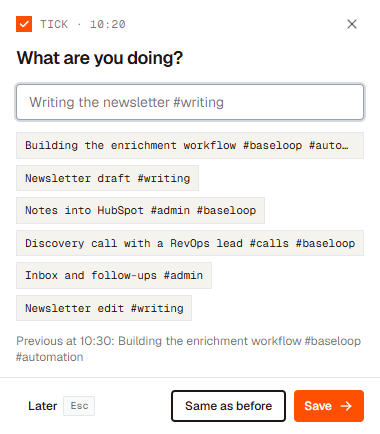
The check-in window. One line, Enter, gone.
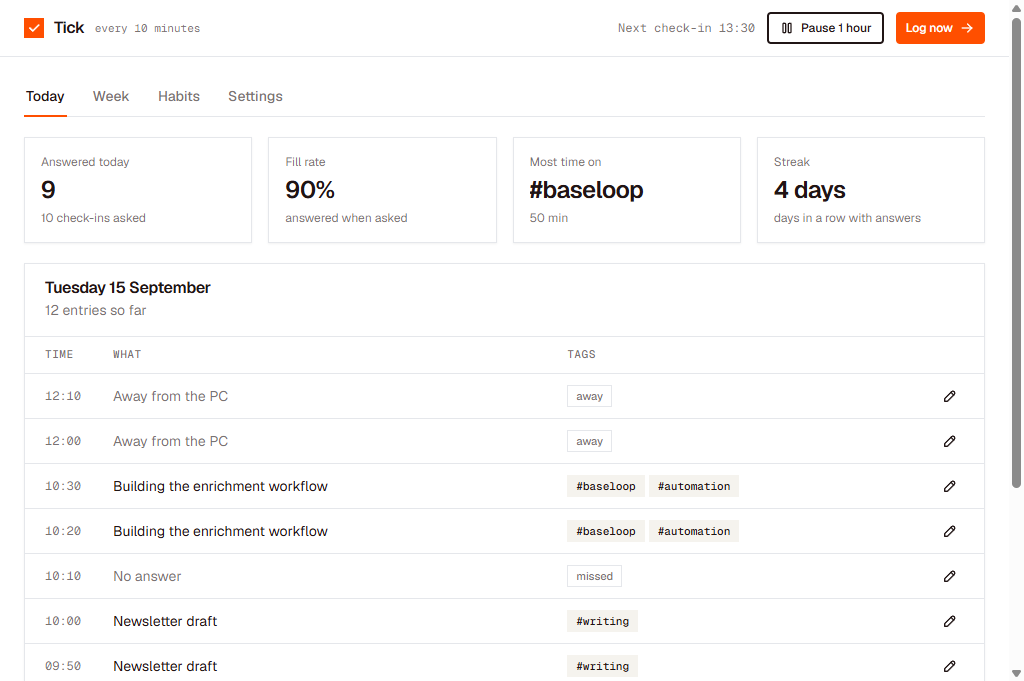
The overview. Answered today, fill rate, most time on and the streak.
Free. All versions are on GitHub.
Tick is built by Vincent van der Plas. New versions and small product notes land on LinkedIn first.
Add or follow me on LinkedIn← vincentvanderplas.com