Thumbring turns the MX Master 4 thumb panel into your own menu
Press the panel and eight quiet buttons appear at your cursor. Thumbring knows which Chrome profile you are working in, so one Gmail button opens the right inbox. Your buttons, your logos, one small config file.
Version 0.1.0 for Windows 10 and 11. Early version, tested on one laptop with one mouse. The app is not signed, so SmartScreen shows "Windows protected your PC" on the first run. "More info" and then "Run anyway" gets past it.
What it looks like
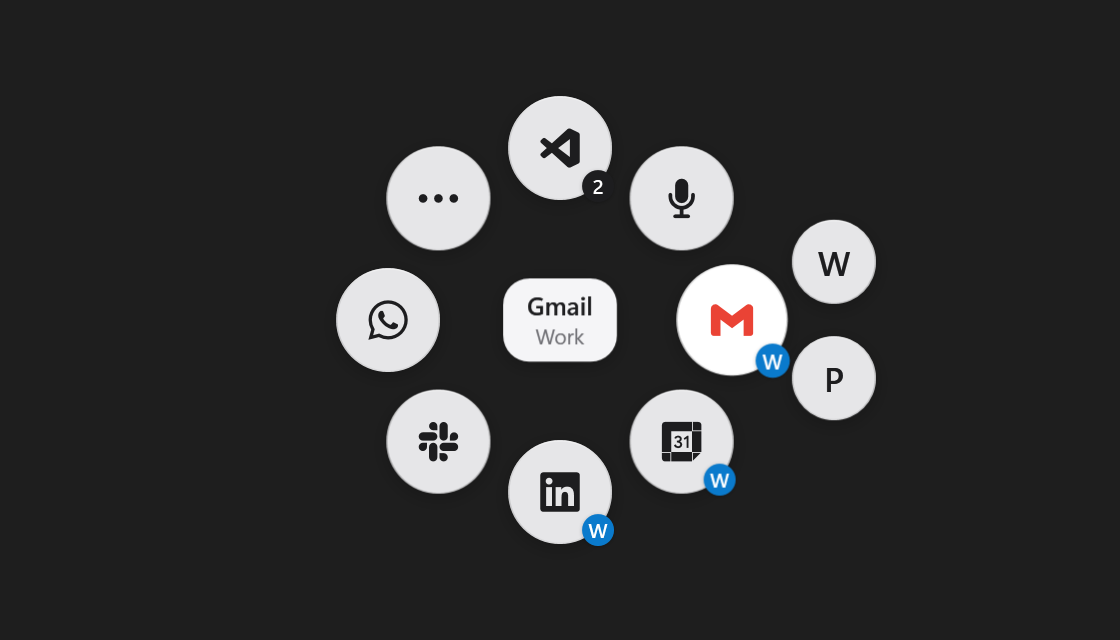
Hover Gmail and the choices fan out. The small badge shows where a click lands.
What it does
Knows your Chrome profile
In your Work profile, Gmail opens Work Gmail. In another app, it goes to the profile you used last.
One button, two accounts
Already on Work Gmail? The same button switches to Personal Gmail. Hover it to choose by hand.
No duplicate tabs
A small Chrome extension jumps to the tab you already have open.
Pulses when Claude is done
For Claude Code users. One pulse when a chat finishes and a knock when it needs permission. Both are silent, so they work during a call.
Dictation on your thumb
Starts Wispr Flow hands-free when it is installed and Windows voice typing otherwise.
Back to where you were
The middle of the ring returns you to the previous window.
Yours to change
Buttons live in one JSON file. Use built-in icons, app icons or your own logo.
Stays on your PC
No account, no analytics and no network code. It reads window titles and never page content.
Up and running in four steps
Unzip and start Thumbring.exe
Keep the folder somewhere permanent. Thumbring appears in the tray and installs its vibration plugin into Logi Plugin Service.
Set the thumb panel in Options+
Click your MX Master 4, click the thumb panel and assign the keyboard shortcut Ctrl+Alt+Shift+F12.
Add the Chrome extension
In each Chrome profile, open chrome://extensions, turn on Developer mode, click Load unpacked and pick the extension folder.
Tick your options in the tray
Right-click the tray icon for Start with Windows, Claude Code alerts, your vibrations and Edit buttons.
Independent project, not made or endorsed by Logitech. You need an MX Master 4 and Logi Options+.