Shorthand types the full text for you
Type ;sig and your signature appears. Type ;addr and your address lands. A snippet can ask for a name, drop in today's date or the clipboard and put the cursor where you need it. Everything stays on your PC in one JSON file.
Version 0.1.0 for Windows 10 and 11. The installer is not signed, so SmartScreen shows "Windows protected your PC" on the first run. "More info" and then "Run anyway" gets past it.
What it does
Forms inside a snippet
A snippet can ask for a name, a multi line body, a choice from a menu or an optional block. A small form opens, you fill it in, the text lands.
Dates that move
%Y-%m-%d is today, %[+1 day] shifts to tomorrow. Weekdays, months, hours and minutes are all there.
Clipboard and cursor
%clipboard drops in what you copied. %| puts the cursor where you want to keep typing.
Case follows you
brb gives be right back, Brb gives Be right back, BRB gives BE RIGHT BACK.
Search anywhere
Ctrl / opens a search box wherever you type. Arrows to move, Enter inserts, Esc closes.
Import from TextExpander
Settings reads a .textexpander file or a CSV of abbreviation and content. The library exports as JSON.
Starts with Windows
Sits hidden in the tray at login. The tray menu turns expansion on or off and opens the search box.
Local only
The keyboard hook watches for your abbreviations and stores nothing. No account, no server, nothing sent anywhere.
Your snippets live in %APPDATA%\Shorthand\data\library.json. The folder is a setting, so it can also sit in a synced or versioned folder.
Up and running in three steps
Run the installer
It installs per user, needs no admin rights and starts Shorthand when it is done. The portable version runs without installing.
Write a snippet
An abbreviation and the text it expands to. A leading ; or / keeps it from firing inside a real word. The editor shows a live preview and lists the fields it will ask for.
Type the abbreviation anywhere
Mail, browser, Slack, HubSpot. The abbreviation is typed as normal and then replaced, so you see it for a moment before the snippet lands.
What it looks like
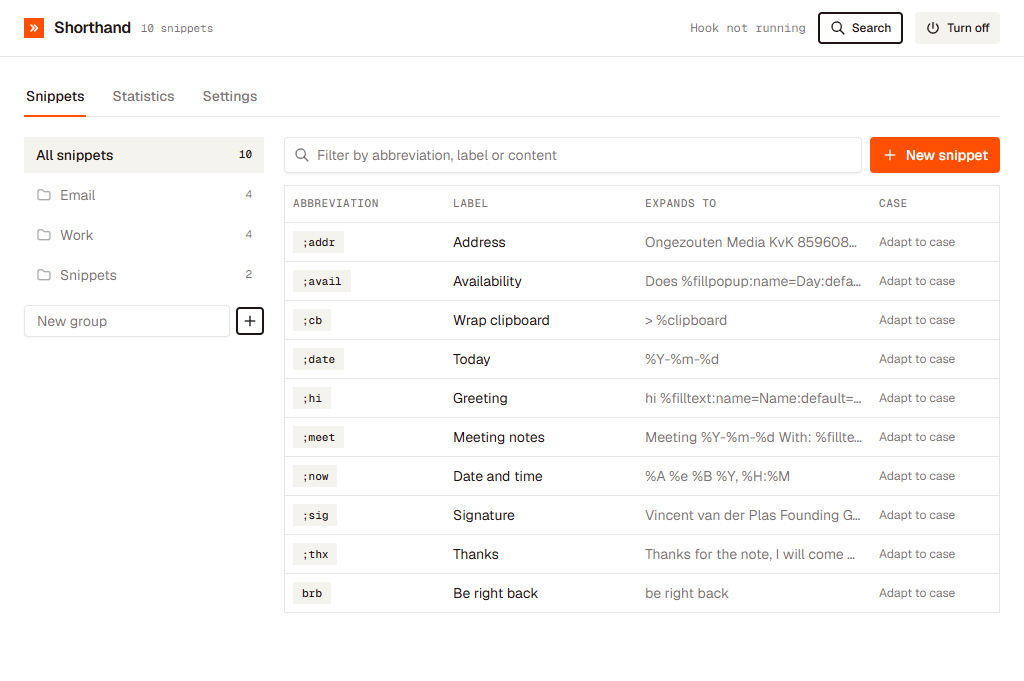
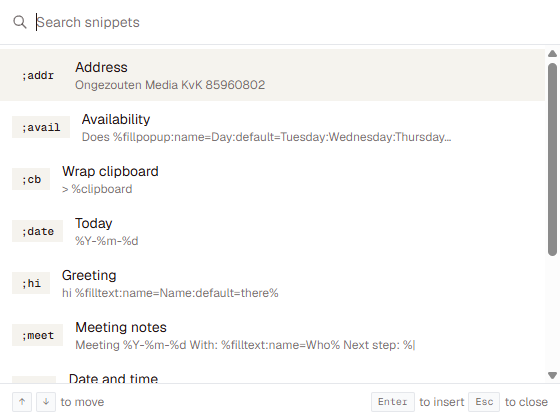
Ctrl / opens the search box wherever you type.
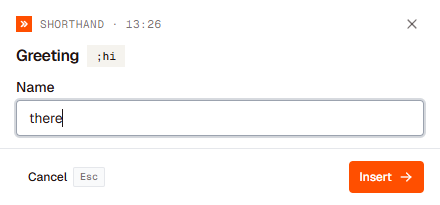
A snippet with a field opens a small form first.
Free. All versions are on GitHub.
Shorthand is built by Vincent van der Plas. New versions and small product notes land on LinkedIn first.
Add or follow me on LinkedIn← vincentvanderplas.com